Picture the phone at your front desk. It's logged into your gym app, and everyone knows the password. The receptionist uses it. The trainers use it. The part-time evening guy uses it too.
It feels easy, until something goes missing. Then nobody knows who did what.
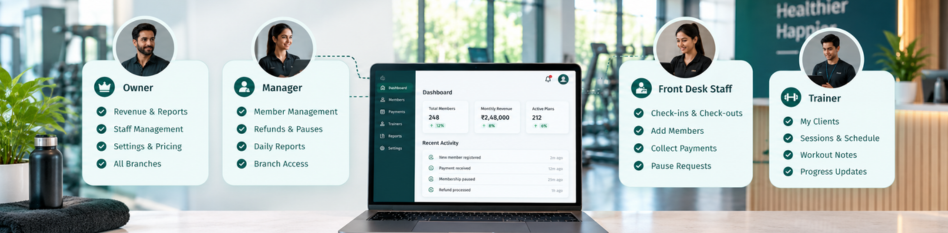
Here's the short answer. Role-based access means each person sees only what their job needs. Owners see the money. Front desk staff handle members and payments. Trainers see their own clients and sessions. A good gym management app sets this up once, and then it just works.
What Is Role-Based Access in a Gym App?
Role-based access is a simple idea. Instead of setting rules for each person, you create roles. Then you give each role its own set of permissions.
Think of a hotel. The manager has a master key. Housekeeping has keys to guest rooms. Guests can only open their own room. Nobody carries a key they don't need.
A gym app works the same way. You might create roles for owner, manager, front desk, and trainer. Each role comes with its own user permissions. When you hire someone, you just pick their role. They get the right access from day one.
Big companies call this role-based access control and use it to protect their data. Your gym deserves the same care.
What Goes Wrong When Everyone Shares One Login?
A shared login feels harmless in a small gym. But it creates three problems that grow with your team.
Money Leaks Nobody Can Trace
When everyone uses the same login, every payment looks the same. You can't tell who collected cash, gave a discount, or deleted a bill.
This isn't a made-up risk. In one reported case, a Bengaluru gym owner filed a police complaint against his manager. He alleged the manager diverted about ₹23 lakh in member payments, some into a personal bank account. Separate logins and clear limits make leaks like this easier to spot early.
Member Data Ends Up in Too Many Hands
Your gym app holds phone numbers, addresses, payment history, and sometimes fingerprints. Not everyone on your team needs all of that. In India, the DPDP Act also expects gyms to protect member data privacy with care.
Mistakes Nobody Can Undo
A new staff member deletes the wrong member. Someone gives a 50% discount instead of 5%. With one shared login, you can't find out who did it. You can clean up the mess, but you can't fix the habit.
What Should Owners See in a Gym App?
Owners should see everything. It's your business, so nothing should be hidden from you.
That includes revenue, pending dues, refunds, payroll, and every report. Your view should cover every staff member's activity too.
Some actions should stay with the owner alone. These usually include adding or removing staff, changing plan prices, and editing payment settings. Deleting members or approving large refunds often belong here as well.
The owner view is also where you spot trouble. If collections drop but attendance stays steady, something is off. Just make sure your dashboard numbers come from one system, so you can trust them.
What Should Front Desk Staff Be Able to Do?
Your front desk is the busiest spot in the gym. Staff there need speed, not screens full of things they'll never use.
The Daily Tasks They Need
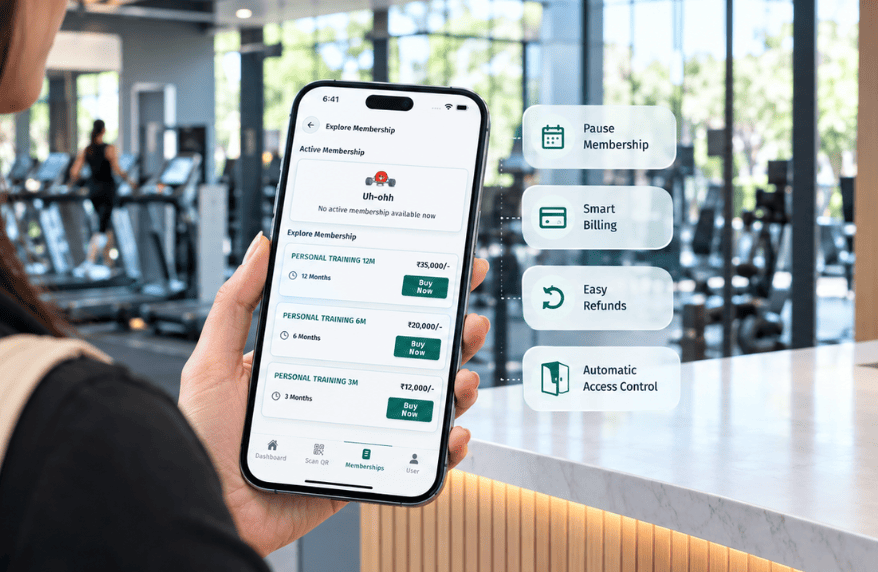
Front desk staff should be able to check members in, add new members, and collect payments. They should handle renewals and answer simple questions about a member's plan. They can also log a pause request, which the app then handles on its own.
What They Shouldn't Touch
Front desk staff usually shouldn't delete members or issue refunds. They shouldn't see full revenue reports or payroll. Discounts should have a cap, like 10%, with anything bigger needing a manager's okay.
This isn't about distrust. Clear limits protect your staff too. If a number looks wrong, nobody at the desk gets blamed without proof.
What Should Trainers See on Their Phone?
Trainers spend their day on the gym floor, not at a desk. Their view of the app should be small and focused. Think of it as a gym trainer app inside your main app.
Their Clients, Sessions, and Schedule
A trainer should see their own clients, booked sessions, and weekly schedule. They should get alerts when a session is booked or moved. FitBoat already lets you assign personal training sessions and track trainer hours.
Workout Notes and Progress, Not Payments
Trainers should be able to add workout notes, diet plans, and progress updates. They don't need member payment details or other trainers' clients.
What they should see is their own numbers. Hours worked and commission earned build trust. When billing and payroll live in one app, trainers can check their own earnings.
How Does Role-Based Access Help Managers and Multiple Branches?
A manager sits between the owner and the front desk. They need more access than staff, but less than you.
A manager might approve bigger discounts, handle refunds within a limit, and view daily reports. They might not change prices or see overall profit.
Branches add another layer. A manager at one branch should see only that branch's members and money. You, as the owner, see every branch side by side. FitBoat supports multiple branches from one account, with branch-wise reports. That keeps each manager focused on their own location.
What Happens When a Staff Member Leaves?
Staff turnover is normal in gyms. But a shared password makes every exit risky.
With separate logins, the fix is simple. You turn off that person's access the same day. Nobody else needs a new password. The rest of the team keeps working as usual.
Their history should stay behind, though. A good app keeps an activity record, often called an audit log. It shows who added a member, collected a payment, or changed a plan. If questions come up later, the answers are already there.
How Do You Set Up Roles Without Slowing Your Team Down?
Too little access slows staff down. Too much access puts your gym at risk. Here's how to find the middle.
Start With Three or Four Roles
Most gyms need only an owner, manager, front desk, and trainer. Add more roles only when a real job needs them. Ten roles for a 12-person gym just creates confusion.
Give the Least Access That Still Gets the Job Done
Ask one question for each permission. Does this role need it every week? If not, leave it off. Staff can always ask a manager when something rare comes up.
Review Roles Every Few Months
Jobs change. A trainer might start helping at the desk, or a new branch might open. Check your roles every quarter. If staff keep asking for the same permission, it probably belongs in their role.
Ready to Give Every Person the Right Access?
Role-based access isn't about locking people out. It's about giving each person exactly what their job needs, and nothing more.
Owners know where the money goes. Staff get a cleaner screen. Trainers get their clients in one place. Want to see how this works day to day? Try FitBoat free for 7 days, with no credit card needed.
Frequently Asked Questions
What Is Role-Based Access in a Gym App?
It means each staff member gets access based on their job. Owners see everything, front desk handles members, and trainers see only their clients.
Why Shouldn't Gym Staff Share One Login?
A shared login hides who did what. You can't trace missing payments, wrong discounts, or deleted records back to the person responsible.
What Should Front Desk Staff Not Have Access To?
Usually not refunds, deleting members, revenue reports, or payroll. Large discounts should need a manager's approval. This protects both the gym and the staff.
Can Trainers Use the Gym App Without Seeing Payments?
Yes. With the right role, trainers see their clients, sessions, and schedule. Payment details and other trainers' clients stay hidden from their view.
How Many Roles Does a Small Gym Need?
Most small gyms need just four: owner, manager, front desk, and trainer. Add more only when a real job needs different access.
What Should You Do When a Staff Member Leaves?
Turn off their access the same day. The rest of your team keeps their logins, and the person's past activity stays on record.


 Built for Indian Gym Owners


