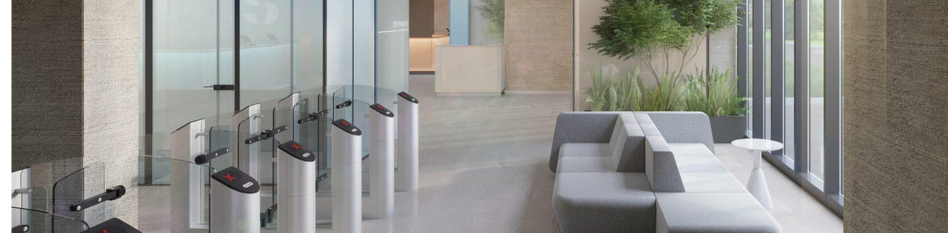
A gym check-in system is two things, not one. There is software that knows who is a current member, and hardware that reads a credential and opens the door.
You have to buy both. Most guides cover only one, which is why gym owners end up with a platform that cannot talk to their door.
What Is a Gym Check-In System? Software and Hardware Explained
The Software Layer: Membership Verification and Attendance Tracking
This holds membership status, expiry dates, and payment state.
When someone presents a credential, the software answers one question. Is this person allowed in right now?
It also logs attendance, which feeds your retention reporting.
The Hardware Layer: Readers, Controllers, and Electric Door Locks
Three parts.
A reader at the door that scans a code, card, or finger. A controller that receives the signal and decides whether to unlock. An electric lock or turnstile that physically opens.
The controller is the part most buyers have never heard of, and the part that causes most problems.
Who Supports the Door When It Fails at 6am
Your software sends a member list to the controller. The controller checks credentials against that list and triggers the lock.
This is where support gets messy. If the door does not open, the fault could sit with your software vendor, your hardware vendor, your installer, or your internet connection.
Ask one question before you buy. If a member cannot get in at 6am, who do I call?
A vendor supplying both layers gives you one number. A mixed setup gives you three, and each will point at the others.
QR Code vs RFID vs Biometric: Check-In Methods Compared
| Method | Speed | Hardware cost | Works offline | Stops sharing | Best for |
|---|---|---|---|---|---|
| QR code in app | 2 to 4 sec | Low | Depends on setup | Weak | Studios, class check-in |
| NFC or mobile wallet | 1 to 2 sec | Medium | Usually yes | Weak | Modern gyms, no cards to lose |
| RFID card or fob | 1 sec | Low per reader | Usually yes | Weak | 24/7 gyms, budget setups |
| Fingerprint | 2 to 3 sec | Medium | Usually yes | Strong | Gyms with sharing problems |
| Face recognition | 1 to 2 sec | High | Usually yes | Strong | Premium and high traffic |
| PIN pad | 4 to 8 sec | Very low | Yes | Very weak | Backup method only |
| Staffed desk | Varies | None | Yes | Medium | Boutique, high touch |
| Self-service kiosk | 3 to 6 sec | Medium | Depends | Weak | Class-based studios |
Two things this shows that vendor feature lists hide.
QR codes and cards do not stop credential sharing. Anyone can screenshot a QR or hand over a fob.
PIN pads are slow. At a busy 6pm entrance, eight seconds per person creates a queue.
Do Gym Entry Systems Work Without the Internet?
This is the question nobody asks, and no competing guide covers it.
Cloud-Only vs Local Caching Access Control
Cloud-only systems check every entry against a server. No internet means no entries. Members stand outside.
Systems with local caching store a copy of the member list on the controller. If the connection drops, the door still works. Entries sync when it returns.
Why Offline Entry Is Non-Negotiable for 24 Hour Gym Access
At 3am there is no staff to let people in manually.
A four-hour outage at a staffed gym is an inconvenience. At an unstaffed gym it is a full day of members unable to train, and complaints you will be answering for a week.
The Offline Question to Ask Every Vendor Before You Sign
'If my internet goes down for six hours, can members still enter, and do those entries get recorded?'
Both halves matter. Some systems let people in but lose the attendance data, which breaks your reporting and your retention tracking.
How to Stop Shared Memberships and Credential Sharing
Most owners buy a check-in system because of revenue leakage, not security.
How Membership Sharing Leaks Revenue
One member shares a QR screenshot or lends a fob. Two people train on one membership.
You have no way to spot it, because the system records a valid entry every time.
Anti-Passback, Rotating Codes, and What Actually Works
Biometrics are the only method that ties entry to a person rather than to a credential. A fingerprint cannot be lent.
Everything else can be shared. You can reduce it with rotating codes or photo verification, but you cannot eliminate it.
Turnstiles vs Unlocked Doors: Stopping Tailgating
A door that unlocks lets two people through on one scan. This is called tailgating, and it is extremely common.
A turnstile or speed gate admits one person per valid entry. It costs considerably more, and it is the only reliable fix.
If sharing is your main concern, the turnstile matters more than the credential type.
Biometric Gym Access: Fingerprint vs Face Recognition
Fingerprint Readers vs Facial Recognition Terminals
Fingerprint readers cost less and are well proven. They struggle with wet or chalky hands, which is a real issue in a gym.
Face recognition is faster and contactless. It costs more and raises more privacy concerns from members.
Biometric Data Consent and Privacy Rules for Gyms
Biometric data is regulated differently across countries, and in some cases across states or provinces. Requirements around consent, storage, and retention vary.
Whatever the rules where you operate, do two things. Get written member consent at signup, and ask your vendor where biometric data is stored and in what form.
How Much Does Gym Access Control Cost Per Door?
If you run a staffed boutique studio with 80 members who all know each other, you do not have a sharing problem.
Do not buy a solution to it.
Gym Access Control Hardware Costs (USD and INR)
Software is usually part of your gym management platform. Hardware is a separate purchase, and this is where budgets go wrong.
Approximate ranges per door. Prices vary by region and supplier.
| Item | USD | INR |
|---|---|---|
| QR or RFID reader | $80 to $250 | ₹6,000 to ₹20,000 |
| Fingerprint reader | $150 to $500 | ₹12,000 to ₹40,000 |
| Face recognition terminal | $300 to $900 | ₹25,000 to ₹75,000 |
| Access controller | $150 to $600 | ₹12,000 to ₹50,000 |
| Electric lock or maglock | $100 to $300 | ₹8,000 to ₹25,000 |
| Turnstile or speed gate | $1,500 to $6,000 | ₹1,20,000 to ₹5,00,000 |
| Installation | $200 to $800 | ₹15,000 to ₹60,000 |
Working example. A single-entrance gym adding fingerprint check-in without a turnstile needs a reader, controller, maglock, and installation. That lands roughly $600 to $2,000, or ₹50,000 to ₹1,60,000.
Add a turnstile and the figure at least doubles.
Retrofitting an Existing Door vs New Build Installation
Retrofitting an existing door is usually cheaper but more constrained. You may need cabling, a power supply near the door, and sometimes a fire-safety review for maglocks on exit routes.
Get an installer to survey the door before you buy anything. Buying hardware that will not fit your entrance is the most common expensive mistake here.
Best Gym Check-In System by Gym Type
Staffed Single-Location Gyms
A card or app QR at a desk is enough. Spend on software, not hardware.
24/7 Unstaffed Gyms: Offline Access and Turnstiles
Offline capability is non-negotiable. Budget for a turnstile if sharing is a concern, and keep a backup entry method.
Boutique Studio with Classes
Check-in is really attendance marking against a booking. A kiosk or app QR is fine. You do not need access control.
Multi-Location
Check whether one platform manages all sites centrally, and whether a member credential works across locations.
Budget-Conscious
RFID cards give the best cost per member. Fingerprint costs more upfront but removes the ongoing cost of replacing lost cards, which adds up faster than owners expect.
Gym Check-In Software Compared: Features by Platform
Listed alphabetically. Verify current capabilities directly with vendors.
| Platform | Check-in methods | Own hardware | Third-party integration |
|---|---|---|---|
| FitBoat | App, RFID, biometric | Biometric and RFID readers | Ask vendor |
| Glofox | App QR, kiosk, RFID | No | Yes |
| GymMaster | PIN, QR, RFID, fob | Yes | Yes |
| Mindbody | App, kiosk, QR, NFC | No | Yes |
| PerfectGym | Biometric, RFID, QR, turnstile | Yes | Yes |
| RhinoFit | QR, RFID, fob | Partial | Yes |
| Virtuagym | App QR, NFC, RFID | No | Yes |
| WellnessLiving | Kiosk, mobile sign-in | No | Limited |
| Zen Planner | Kiosk, RFID, PIN | No | Yes |
FitBoat Gym Check-In System: Where It Fits
FitBoat supports RFID and biometric check-in and check-out, with member entry through the app.
Access control works across multiple centres and across separate rooms within a site. A member can be permitted onto the gym floor but not into the pool.
Attendance is tracked for both members and staff, and feeds directly into reporting.
Best for multi-location operators and gyms running separate access zones.
Not for you if you need turnstile integration at enterprise scale, or you want a single vendor supplying both software and full door hardware. PerfectGym and GymMaster are stronger on both counts.
Pricing is quoted per gym based on locations and requirements. A 7-day free trial is available.
Common Gym Check-In System Mistakes to Avoid
Buying hardware first. Choose software, then buy hardware it supports. The reverse leaves you with a reader nothing can talk to.
Ignoring offline. Ask before you sign, not after your first outage.
No backup entry. Always keep a second way in, whether a PIN or staff override.
Biometrics without a consent process. Collect written consent at signup.
One reader on a busy entrance. If 40 people arrive at 6pm, one reader creates a queue. A second reader costs less than losing members to a five-minute wait.
Conclusion
Most gym owners buy a check-in system to stop revenue leaking through shared memberships. That goal points to specific answers. Biometrics tie entry to a person. A turnstile stops two people entering on one scan. A card reader on an unlocked door does neither.
Before choosing anything, get three answers in writing. Does it work when the internet is down. Who supports the door when it fails. What does installation cost at my specific entrance.
Then have an installer look at the door before you spend on hardware. Entrances vary more than vendors admit, and hardware bought for the wrong door is money you do not get back.
Start with the software your gym already runs and check what it supports. That constraint usually makes the rest of the decision for you.
Frequently Asked Questions
What is a gym check-in system?
Software that verifies membership status, paired with hardware that reads a credential and opens the door. The software confirms who is allowed in. The hardware controls entry.
What check-in system do most gyms use?
RFID cards and fobs remain the most common because they are cheap and fast. App-based QR codes are growing quickly. Biometrics are usual in 24/7 gyms and anywhere credential sharing is a problem.
What is the app for gym check-ins?
Most gym management platforms include check-in in their member app, usually through a QR code or NFC tap. There is no single standard app. It depends on what your gym uses.
Why do gyms make you check in?
Three reasons. To confirm your membership is active, to stop non-members using the facility, and to record attendance. Attendance data is the strongest early warning signal for members about to cancel.
How much does a gym check-in system cost?
Roughly $600 to $2,000 per door for a basic setup including reader, controller, lock, and installation. Turnstiles start around $1,500 each. Software is usually part of your existing platform.
Do gym check-in systems work without the internet?
Some do, some do not. Systems with local caching store the member list on the controller and keep working offline. Cloud-only systems stop. Ask specifically before buying, especially for 24/7 operation.
Is biometric check-in legal for gyms?
Biometric data is regulated, and rules differ by country and region. Get written member consent and confirm with your vendor how data is stored. Check current requirements for your market.
Can members share a check-in code?
Yes, with QR codes, cards, fobs, and PINs. Only biometrics tie entry to a person. Preventing two people entering on one scan needs a turnstile rather than a door.


 Built for Indian Gym Owners


